I wonder if we could add/extend stumpy to get a bmp? Oh, they already have bmp: GitHub - stumpycr/stumpy_bmp .  Last updated
 on Jun 15, 2019, but hopefully it will work.
FYI.
I submitted the optimized Ruby version to the site today (Wed April 21, 2021) to replace the old version, and have been informed it’s been merged. So now you can get the optimized Ruby version from the website.
New version of TruffleRuby is able to run benchmark now, but is very slow compared to MRI (more that 30x slower). I have no idea why is that Ruby Raytracer in Crystal - #4 by vlazar - Ruby-Forum
Maybe raise issue to TruffleRuby to give them feedback.
From my experience, there are some things TruffleRuby can optimize very well, but others not. It still doesn’t do so well with Rails code either.
I haven’t looked yet, but what MRI version is it compatible with now?
Yeah, good idea. They should notice it as they take performance very seriously.
According to info TruffleRuby should be compatible with MRI 2.7.2
% ruby --version
truffleruby 21.1.0, like ruby 2.7.2, GraalVM CE Native [x86_64-darwin]
Opened an issue on TruffleRuby repo about poor performance Raytracer benchmark is 34x slower than with MRI · Issue #2336 · oracle/truffleruby · GitHub
FYI.
I submitted an updated Rust version that was merged today (Mon April 26, 2021), and new timings were released.
And coming in at No. 5, in front of D and Rust…
@jzakiya TruffleRuby team found an issue with Ruby benchmark being very slow. It’s caused by the use of String to represent an image. If changed to Array the Ruby version would become 15% in MRI and TruffleRuby would be the fastest.
See Raytracer benchmark is 34x slower than with MRI · Issue #2336 · oracle/truffleruby · GitHub
Just for kicks, I tried to make this really, really fast. Here is the code: code
It runs in about 20 17 15 10 9 6 to 7ms in my machine so surely I am doing something weird, right? The image looks ok to me.
For comparison, the original crystal took 49ms, C takes 40ms and rust parallel takes 7 to 8ms
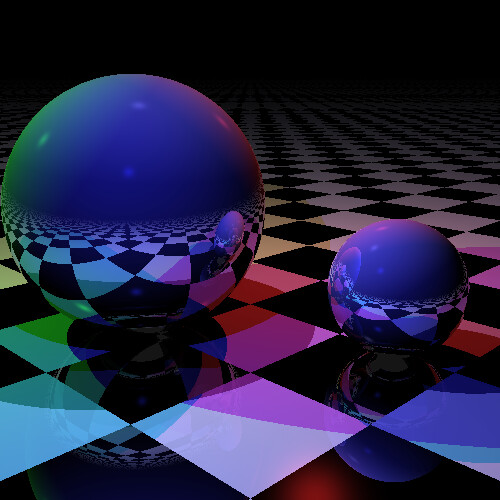
I must confess I am doing a bunch of rather weird things, but the raytracing algo was not modified.
Here is a description of said weird things: Making code 1800x faster, step by step. | Ralsina.Me
Great writeup, thanks.
Btw, I thought an optimization could be simplifying the work stealing part with
next_available_row = Atomic.new(0)
# and then...
y = next_available_row.add(1)
break if y >= height
but the timings got worse! (!??) I have a lot to learn about multitasking yet…
It’s intriguing, I have no idea why that would be slower!
My older (2024) Lenovo LegionSlim system, using crystal-1.19.0-dev-1
➜  ~ fastfetch
            mhhhyyyyhhhdN                jzakiya@jz1
        dyssyhhhhhhhhhhhssyhN            -----------
     Nysyhhyo/:-.....-/oyhhhssd          OS: PCLinuxOS 2026 x86_64
   Nsshhy+.              `/shhysm        Host: 83DH (Legion Slim 5 16AHP9)
  dohhy/                    -shhsy       Kernel: Linux 6.12.63-pclos1
 dohhs`                       /hhys      Uptime: 1 hour, 16 mins
N+hho   +ssssss+-   .+syhys+   /hhsy     Packages: 3158 (rpm)
ohhh`   ymmo++hmm+`smmy/::+y`   shh+     Shell: zsh 5.8
+hho    ymm-  /mmy+mms          :hhod    Display (default): 2560x1600 @ 1.15x
/hh+    ymmhhdmmh.smm/          .hhsh    DE: KDE Plasma
+hhs    ymm+::-`  /mmy`    `    /hh+m    WM: KWin (PCLinuxOS)
yyhh-   ymm-       /dmdyosyd`  `yhh+     WM Theme: Breeze
 ohhy`  ://`         -/+++/-   ohhom     Theme: Breeze (Light) [Qt], Breeze [GTK2/]
 N+hhy-                      `shhoh      Icons: breeze [Qt], breeze [GTK2/3/4]
   sshho.                  `+hhyom       Font: Open Sans Semibold (12pt, Regular) ]
    dsyhhs/.            `:ohhhoy         Cursor: PolarCursorTheme (24px)
      dysyhhhso///://+syhhhssh           Terminal: konsole 25.12.1
         dhyssyhhhhhhyssyyhN             CPU: AMD Ryzen 7 8845HS (16) @ 5.14 GHz
              mddhdhdmN                  GPU 1: NVIDIA Device 2860 (VGA compatible)
                                         GPU 2: AMD Radeon 780M Graphics [Integrat]
                                         Memory: 3.40 GiB / 14.95 GiB (23%)
                                         Swap: 0 B / 5.72 GiB (0%)
                                         Disk (/): 20.88 GiB / 47.76 GiB (44%) - e4
                                         Disk (/home): 160.59 GiB / 883.85 GiB (184
                                         Local IP (wlan0): 10.18.232.32/8
                                         Battery (L22M4PC2): 98% [AC Connected]
                                         Locale: en_US.UTF-8


➜  ~
Times
➜  raytracer_new CRYSTAL_WORKERS=16 ./bin/raytracer
Completed in 3.85 ms
➜  raytracer_new
When I get home I’ll run it on my newer (2025) AMD system, 5.4GHz w/32 threads.

You got nicer toys than I ;-)
Hey, that means we could render scenes at 30fps :-D
WTH not. This uses f64 so it’s slower than f32. The original version only worked with f32 by chance 


The 500x500 image is too small for Crystal to give good results, so I did larger images.
This table shows results for larger images on both my laptops.
------------|-----------------------------------------------------|
            |         AMD 8845HS       |         AMD 7945HX       |
            |       5.1GHz, 8C|16T     |       5.4GHz, 16C|32T    |
            |-----------------------------------------------------|
            |        lo, hi, avg of 10 runs, times in msec        |
------------|-----------------------------------------------------|
   image    |   lo   |   hi   |   avg  |   lo   |   hi   |  avg   |
------------|--------|--------|--------|--------|--------|--------|
  5k x 5k   | 374.35 | 379.77 | 376.90 | 214.99 | 249.70 | 243.53 |
------------|--------|--------|--------|--------|--------|--------|
  8k x 8k   | 965.22 | 990.66 | 971.83 | 603.23 | 635.01 | 619.54 |
------------|-----------------------------------------------------|
I was also able to do 9kx9k (~1220ms|~700ms) but 10kx10k gave these errors.
➜  raytracer_new CRYSTAL_WORKERS=16 ./bin/raytracer
Unhandled exception in spawn: Arithmetic overflow (OverflowError)
  from src/raytracer.cr:255:37 in 'trace_ray'
  from src/raytracer.cr:272:6 in 'trace_ray'
  from src/raytracer.cr:272:6 in 'trace_ray'
  from src/raytracer.cr:354:13 in '->'
  from /home/jzakiya/crystal/share/crystal/src/fiber.cr:170:11 in 'run'
  from ???
^C
➜  raytracer_new
I changed the Int32s to Int64s in the code but still got errors, so I called it a day.
Maybe you can fix code to do larger images.
Just for references, here are the different size images.
5k x 5k

8k x 8k

9k x 9k

Latest code has more binaries. bin/benchmark is “does the same as the others in the original repo, fast as possible”
The bin/raytracer and bin/animated binaries have fully bound-checked (AFAIK) arithmetic so they should work fine. Also you can set SIZE=10000 to see what happens. Here is SIZE=10000 with AAx4 so you can zoom A LOT and still see pretty (took 4.2 seconds)

… but the forum shrinks it to 1920x1920 which still looks awesome if I may say so myself.
Here’s the 10x image: crystal raytracer — Postimages
Just curious, how long does the 500x500 image take in your monster machine?
With width, height = 500, 500 my big laptop gives ~2.9 - 3.3ms and jumps around a lot because you’re essentially in the noise range of the arithmetic operations. The larger sizes are more stable|consistent as the system noise is averaging out.
So, all I did was change the width|height values at the end of the code. What values are you changing to get your pictures?